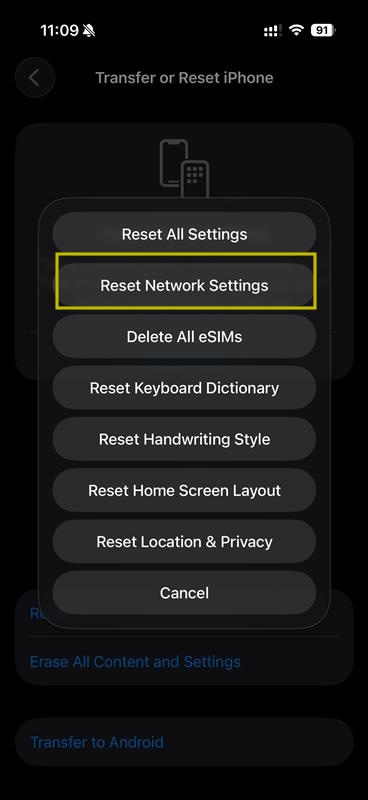
Sometimes it is necessary to reset the network settings on an iPhone, this may be due to swapping SIMs in and out of the device, if you're roaming in multiple countries, or have been advised to do so by your network operator. Here is a brief guide on how to do it on iPhone (software version 26.3.1) - Disclaimer - Some screens may vary depending on model and software version.
Step 1
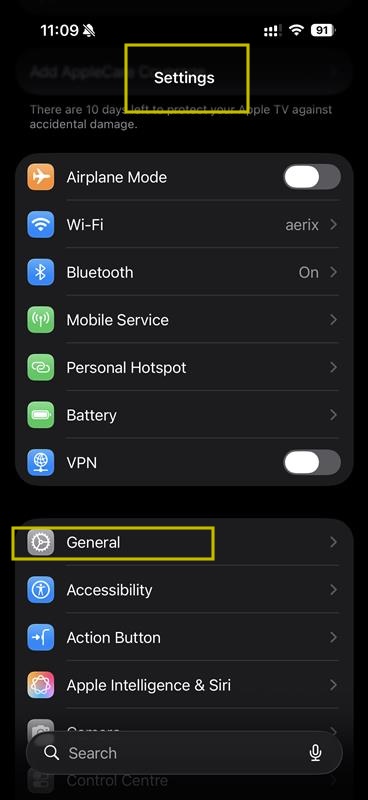
From the home screen, find or search for your Settings menu. Once there, please find the General menu and click it.
Step 2
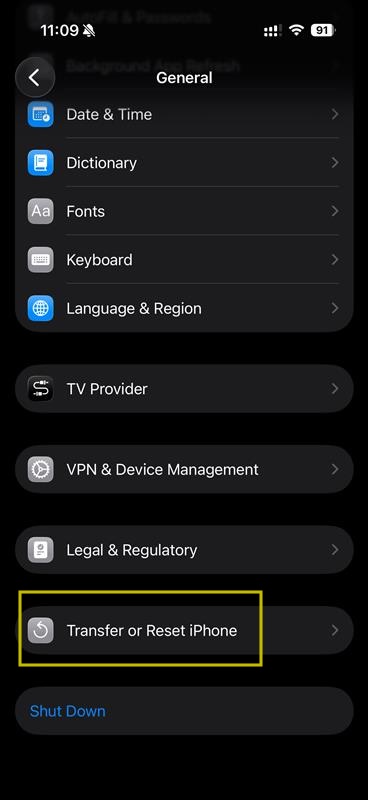
Once you are inside the General menu, scroll to the bottom to find the Transfer or Reset iPhone menu
Step 3
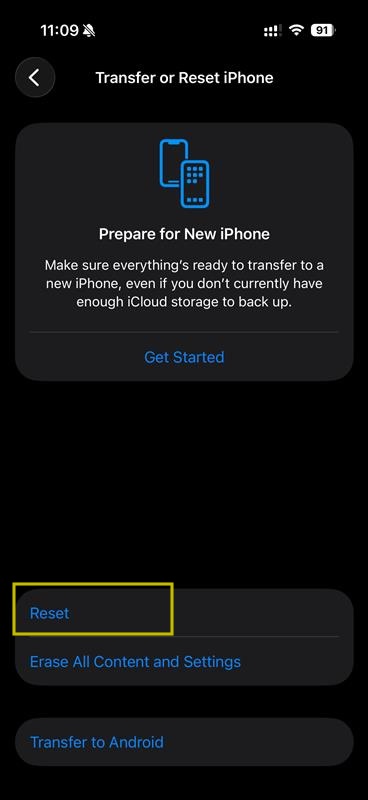
Inside the Transfer or Reset iPhone menu, press the Reset button (as highlighted below)
The final Step
Step 4
When the menu comes up, the only option you are looking for here is Reset Network Settings the other options are self explanatory. Disclaimer, pressing other items can have different effects, so only press the one advised.